AR Sketch - Easy Drawing1.0.8
Publisher Description
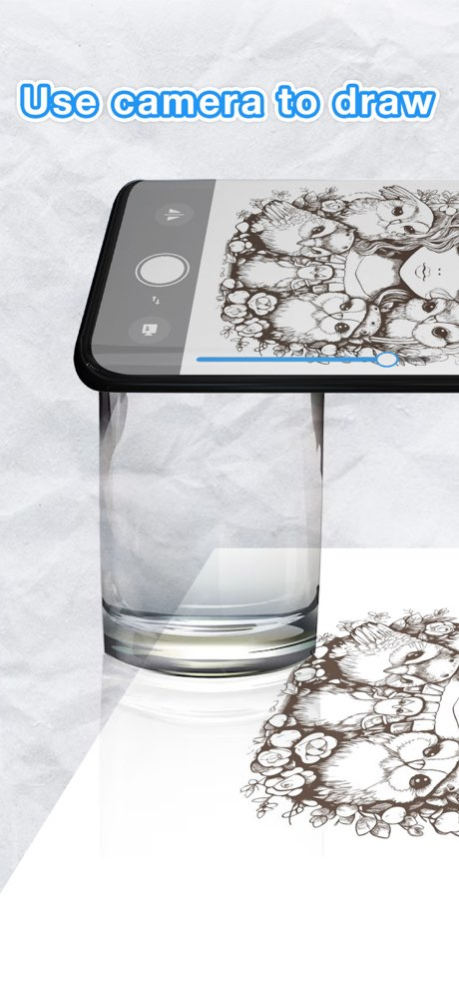

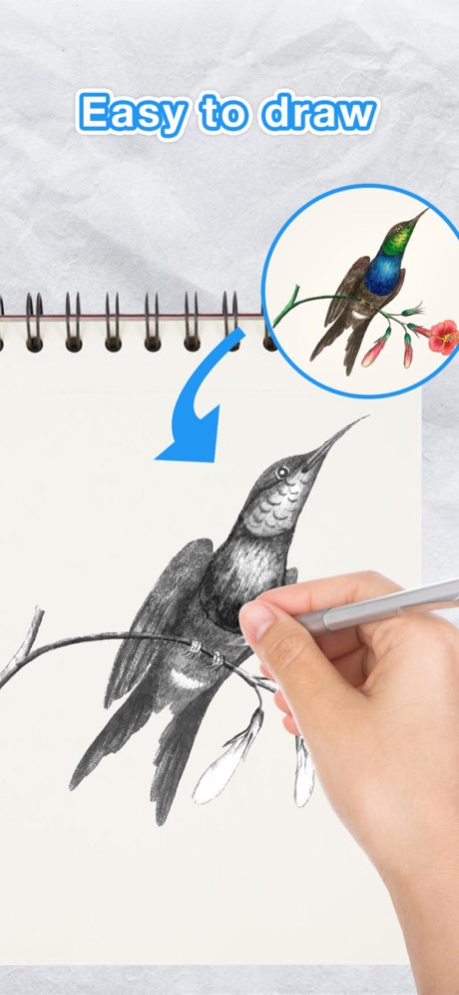

AR Sketch - Redefining Creativity with Augmented Reality Drawing
Have you tried AR helping with your drawings? Introduce AR Sketch - Easy Drawing - a revolutionary app that uses Augmented Reality (AR) to transform the way you draw, sketch, and paint.
Unleash your imagination and bring your sketches to life with AR Sketch! Our revolutionary app combines the power of augmented reality with intuitive drawing tools, empowering you to create stunning artwork like never before.
Just trace a projected picture on paper and color it, drawing has never been easier. With just a few steps, you can complete your painting. AR Sketch - Easy Drawing will help you learn to draw sketches at ease!
Key Features:
+ Sketch AR: Dive into the world of augmented reality drawing with our innovative Sketch AR feature. Simply point your phone's camera at any surface, select a template image, and watch as it magically appears in front of you. Trace and redraw effortlessly, adding your unique touch to each masterpiece.
+ Gallery Integration: Your creativity knows no bounds. AR Sketch allows you to import images from your device's gallery, turning any photo into a canvas for your artistic expression. Whether it's a cherished memory or a breathtaking landscape, transform it into a work of art with a few taps.
+ AI Generated Templates: Need inspiration? Let our AI-powered generator spark your creativity. Choose from a wide array of pre-generated templates or let the algorithm create one based on your preferences. With endless possibilities at your fingertips, every drawing becomes a journey of discovery.
+ Easy to Use, Powerful Results: AR Sketch is designed with simplicity in mind, making it accessible to artists of all skill levels. Whether you're a seasoned professional or a budding enthusiast, our intuitive interface and robust features ensure that your creativity shines through.
+ Draw and trace with AR technology.
+ Color and finish your creation.
+ 100+ Free samples of painting and tracing templates to trace anything.
+ Lots of tracing genres to trace anything: Animals, Nature, Food, Anime etc.
+ Convert your own picture for easy drawing using AI Conversion tool.
+ Record time-lapse videos of your drawings, capture, analyze, and refine your workflows.
+ Improve sketches with various options to create a complete photo drawing
+ User-friendly features and interface make it easy to learn and use for both beginners and experienced artists.
How to use
1. Locate the phone on a steady tripod or object.
2. Open AR Sketch - Easy Drawing.
3. Import or choose a picture from Art Gallery
4. Convert your picture into border sketch.
5. Adjust the AR version of picture on canvas or paper.
6. Create your own stunning masterpieces!
Explore the world of augmented reality art and take your creativity to a new level. Download AR Sketch - Easy Drawing today and start drawing out of your imagination!
If you find AR Sketch - Easy Drawing helpful, please rate us and share AR Sketch - Easy Drawing with your friends. Thank you!
Terms of Use: https://www.apple.com/legal/internet-services/itunes/dev/stdeula/
Privacy policy: https://sites.google.com/view/trendingboss
Version History + Fix some bugs 1.0.8 04/02/2025 Fixed bugs, improved performance, drank way too much coffee. 1.0.6 12/03/2024 - bug fixes 1.0.5 08/22/2024 - bug fixes 1.0.4 05/15/2024 - bug fixes 1.0.3 05/10/2024 - bug fixes 1.0.2 05/06/2024 - bug fixes 1.0.1 04/19/2024 1.0.0 04/17/2024
About AR Sketch - Easy Drawing
The company that develops AR Sketch - Easy Drawing is Kim Tung Le. The latest version released by its developer is 1.0.8.
To install AR Sketch - Easy Drawing on your iOS device, just click the green Continue To App button above to start the installation process. The app is listed on our website since 2026-10-14 and was downloaded 0 times. We have already checked if the download link is safe, however for your own protection we recommend that you scan the downloaded app with your antivirus. Your antivirus may detect the AR Sketch - Easy Drawing as malware if the download link is broken.
How to install AR Sketch - Easy Drawing on your iOS device:
- Click on the Continue To App button on our website. This will redirect you to the App Store.
- Once the AR Sketch - Easy Drawing is shown in the iTunes listing of your iOS device, you can start its download and installation. Tap on the GET button to the right of the app to start downloading it.
- If you are not logged-in the iOS appstore app, you'll be prompted for your your Apple ID and/or password.
- After AR Sketch - Easy Drawing is downloaded, you'll see an INSTALL button to the right. Tap on it to start the actual installation of the iOS app.
- Once installation is finished you can tap on the OPEN button to start it. Its icon will also be added to your device home screen.
Program Details
System requirements
Download information
Pricing
Version History
version 1.0.8
posted on 2026-10-14
Version History + Fix some bugs 1.0.8 04/02/2025 Fixed bugs, improved performance, drank way too much coffee. 1.0.6 12/03/2024 - bug fixes 1.0.5 08/22/2024 - bug fixes 1.0.4 05/15/2024 - bug fixes 1.0.3 05/10/2024 - bug fixes 1.0.2 05/06/2024 - bug fixes 1.0.1 04/19/2024 1.0.0 04/17/2024
version 1.0.8
posted on 2025-04-02
+ Fix some bugs
